Program Arcade GamesWith Python And Pygame
Lab 6: Loopy Lab
Each part of this lab is worth 5 points.
6.1 Part 1
Write a Python program that will print the following:
10
11 12
13 14 15
16 17 18 19
20 21 22 23 24
25 26 27 28 29 30
31 32 33 34 35 36 37
38 39 40 41 42 43 44 45
46 47 48 49 50 51 52 53 54
Tips for Part 1
- Generate the output for part one using two for loops, one nested.
- To start, go back to chapter 6 and remember how to create a triangle of asterisks. Recreate that.
- Then create a new variable. Don't use i, j, row, or column, or whatever you already used. Set it to your starting value. Print that.
This problem requires a bit of an “a-ha” to get. Make sure to ask around if you have problems. My students often find it to be one of the harder problems in this course.
6.2 Part 2
Create a big box out of n rows of little o's for any desired size n. Use an input statement to allow the user to enter the value for n and then print the properly sized box.
E.g. n = 3
oooooo
o    o
oooooo

E.g. n = 8
oooooooooooooooo
o              o
o              o
o              o
o              o
o              o
o              o
oooooooooooooooo
Tip: Break this problem into parts. First, draw the first line with the proper number of o's:
oooooo
Then, draw the last line too:
oooooo
oooooo
Then, print an o between them:
oooooo
o
oooooo
Then repeat it:
oooooo
o
o
o
o
oooooo
Then add another one:
oooooo
oo
oo
oo
oo
oooooo
Then add spaces:
oooooo
o    o
o    o
o    o
o    o
oooooo
6.3 Part 3
Print the following for any positive integer n. Use an input statement to allow the user to enter the value for n and then print the properly sized box.
E.g. n = 3

1 3 5 5 3 1
3 5     5 3
5         5
5         5
3 5     5 3
1 3 5 5 3 1

E.g. n = 5
1 3 5 7 9 9 7 5 3 1
3 5 7 9     9 7 5 3
5 7 9         9 7 5
7 9             9 7
9                 9
9                 9
7 9             9 7
5 7 9         9 7 5
3 5 7 9     9 7 5 3
1 3 5 7 9 9 7 5 3 1
Don't worry about handling the spacing for multi-digit numbers. Chapter 20 covers this if you want to look ahead, but it isn't needed.
This part of the lab is difficult. Skip to part 4 if you aren't interested in the challenge.
6.4 Part 4
Start with the pygame template code:
pygame_base_template.py
Use nested for loops
to draw small green rectangles. Make the image look like Figure 27.1.
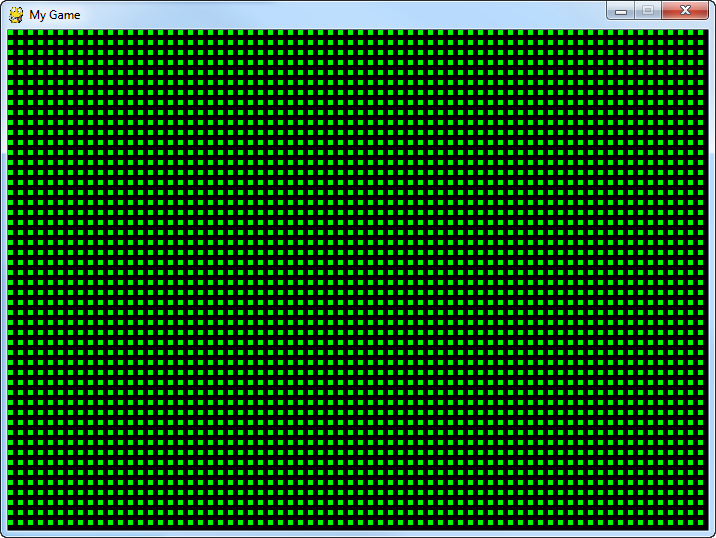
Do not create the grid by drawing lines, use a grid created by rectangles.
If this is too boring, create a similar grid of something else. It is OK to change the color, size, and type of shape drawn. Just get used to using nested for loops to generate a grid.
Some students feel the need to add a zero to the offset in the lab. Remind yourself that adding zero to a number is kind of silly.
English version by Paul Vincent Craven
Spanish version by Antonio Rodríguez Verdugo
Russian version by Vladimir Slav
Turkish version by Güray Yildirim
Portuguese version by Armando Marques Sobrinho and Tati Carvalho
Dutch version by Frank Waegeman
Hungarian version by Nagy Attila
Finnish version by Jouko Järvenpää
French version by Franco Rossi
Korean version by Kim Zeung-Il
Chinese version by Kai Lin