Program Arcade GamesWith Python And Pygame
Before getting started...
Are you here because you want to create your own games? Excellent!
Here are some videos of games students have created by the end of this course:
This foreword has two parts:
- Getting your computer set up to write games.
- Job and career prospects in technology.
0.1 Installing and Starting Python
To get started, two programs need to be installed, Python and Pygame. Python is the computer language we will program in, and Pygame is a library of commands that will help make writing games easier.
0.1.1 Windows Installation
If you are working with a computer that already has Python and Pygame set up on it, you can skip this step. But if you want to set up Python and Pygame on your own Windows computer, don't worry. It is very easy.
- Run the Python installer downloaded from:
www.python.org/downloads/ - Then install Pygame on Windows by typing:
pip install pygame
or on Mac/Linux by:pip3 install pygame
Once everything has been installed, start Python up by selecting the Integrated Development
Environment (IDLE) as shown in Figure 0.1
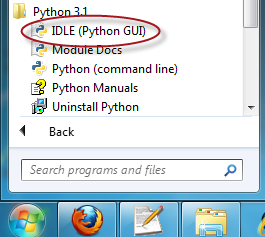
The original files provided here come from the Python download page at:
http://www.python.org/download/
...and the Pygame file originally comes from:
https://bitbucket.org/pygame/pygame/downloads
Note: There are many versions of Python and Pygame. It can be complicated to get the correct versions and get them to work together. I recommend using the links here on ProgramArcadeGames.com rather than download from the Python and Pygame websites.
If you must use a different version of Python than what is listed here, find a matching
version of Pygame at this website:
www.lfd.uci.edu/~gohlke/pythonlibs/#pygame
0.1.2 Mac Installation
The installation for the Mac is a bit involved, but it isn't too bad. Here are the steps.
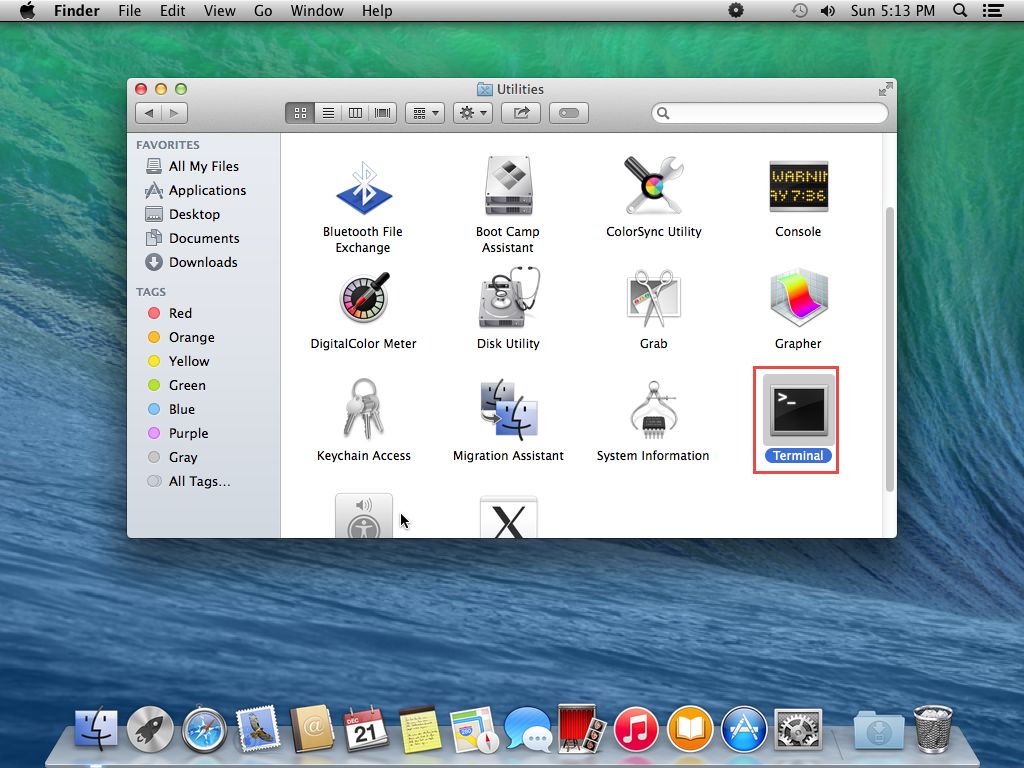
- Open up a terminal window. Click on “Finder” then “Applications” and
then open “Utilities.”
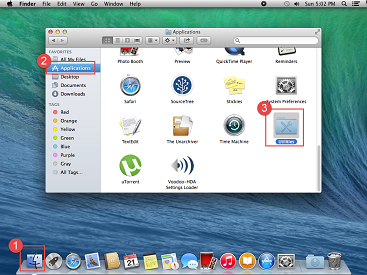
Figure 0.2: Starting a terminal window - Double-click on “Terminal”
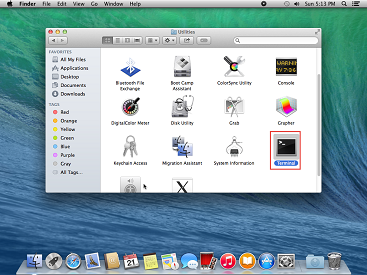
Figure 0.3: Starting a terminal window - We can issue commands to the Mac in the “old-school” style by typing them
rather than pointing and clicking. We are going to start by typing in a command
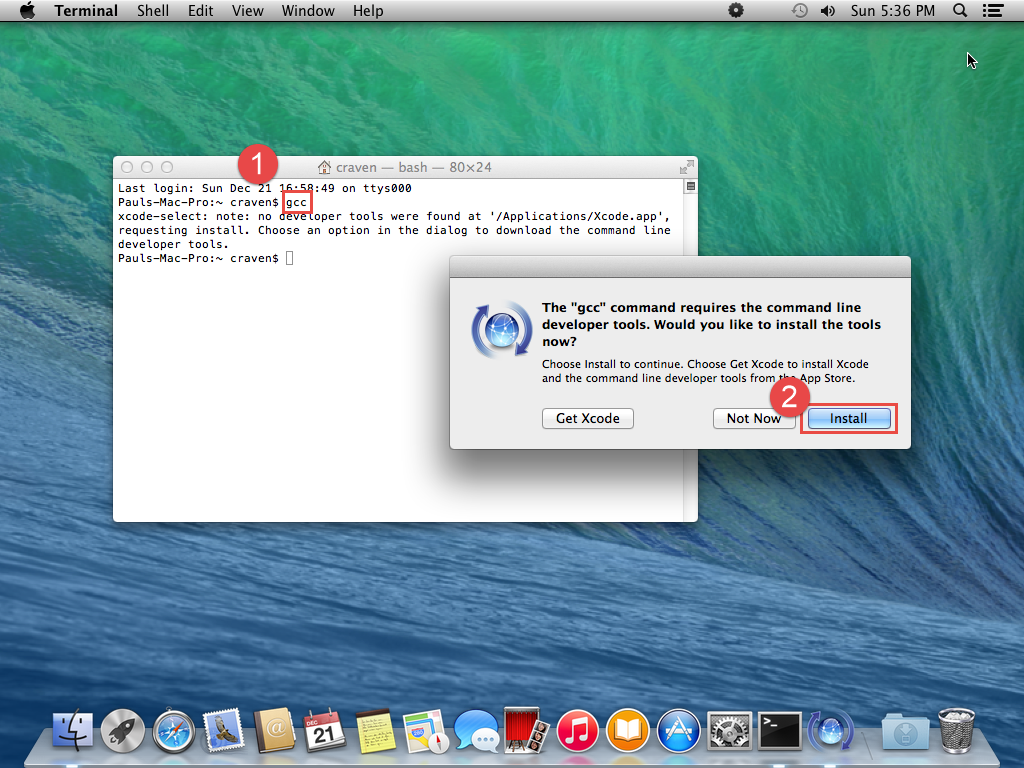
you probably don't have yet. This command is gcc. Type this and hit
the Enter key. Your Mac will recognize
that you don't have this command and offer to install it for you. Go ahead and do this.
(If instead it says error: no input files you already have gcc, so go on
to the next step.)
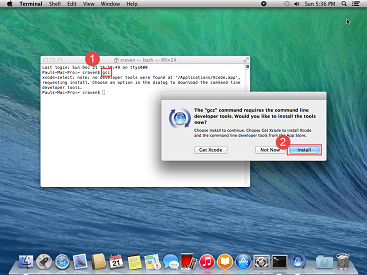
Figure 0.4: Starting a terminal window - Install XQuartz from:
http://xquartz.macosforge.org - Line by line, copy and paste the following items into your terminal window:
ruby -e "$(curl -fsSL https://raw.githubusercontent.com/Homebrew/install/master/install)"
sudo brew doctor
brew update
brew install python3
brew install sdl sdl_image sdl_mixer sdl_ttf portmidi mercurial
brew install libogg libvorbis
brew install sdl_mixer --with-libvorbis
- If feedback for the last line says 'sdl_mixer already installed’,
Then type:
brew reinstall sdl_mixer -—with-libvorbis
- If you want support for MP3's and movies, you can try adding smpeg. I've
found support for this to be kind of spotty, so if this line doesn't work you
can just use Ogg Vorbis files instead.
brew install smpeg
- Now you have all the supporting libraries. Let's finally install Pygame. Replace
YourName with your account name. If you don't know what your account
name is, type ls /Users to see all the user accounts on your computer.
cd /Users/YourName/Downloads
hg clone https://bitbucket.org/pygame/pygame
cd pygame
cd src
pip3 install /Users/YourName/Downloads/pygame

At this point, Pygame and Python should be up and running on your system. Python does not come with a way to edit files, so you will need to download an IDE like the free Wing 101 IDE.
After you install Wing (or whatever) your Python IDE probably is going to point to an older version of Python that your Mac comes with. Not the new one we just installed. So, again at the terminal type:
which python3
You should get something like /usr/local/bin/python3 or maybe something super long with "Library" in it. Copy that from the terminal. It is called the “path” to your Python program. Then:
- Open up Wing IDE
- Click "Edit" menu, followed by "Configure Python" sub-menu
- Click the “Custom” Python radio button.
- Paste the path we copied above.
- Click ok, and then Wing will say it needs to restart Python. That's ok. Once restarted you should be using the Python we just installed.
0.1.3 Unix Installation
Unix and Unix-like distributions may come with a Pygame package, or the ability to easily get one. If you want to compile from source, this is what I've used on Linux Mint:
# Load required packages
sudo apt-get install mercurial libsdl1.2-dev
sudo apt-get install libasound2-doc libglib2.0-doc python3-dev
sudo apt-get install libsdl-ttf2.0-dev  libsdl-image1.2-dev
sudo apt-get install libsdl-mixer1.2-dev libportmidi-dev
sudo apt-get install libavformat-dev libswscale-dev
sudo apt-get install libfreetype6-dev
sudo apt-get install libsmpeg-dev

# Use mercurial to clone current code
hg clone https://bitbucket.org/pygame/pygame

# Build and install
cd pygame
sudo python3 setup.py
The biggest risk on UNIX platforms is that your default Python version might be in the 2.x series, and that code won't work with the code examples here in the book. Make sure you have and are using Python 3.x.
0.1.4 Optional Wing IDE
Python comes with an editor and an environment to develop code in. Unfortunately it isn't very good. My students usually run into the following two issues when using Python's default editor:
Issue 1, when working with multiple files it is difficult to keep track of the all the open files. It is easy to forget to save a file before running the program. When this happens the program runs with the old code that was saved rather than the new code. This is very confusing.
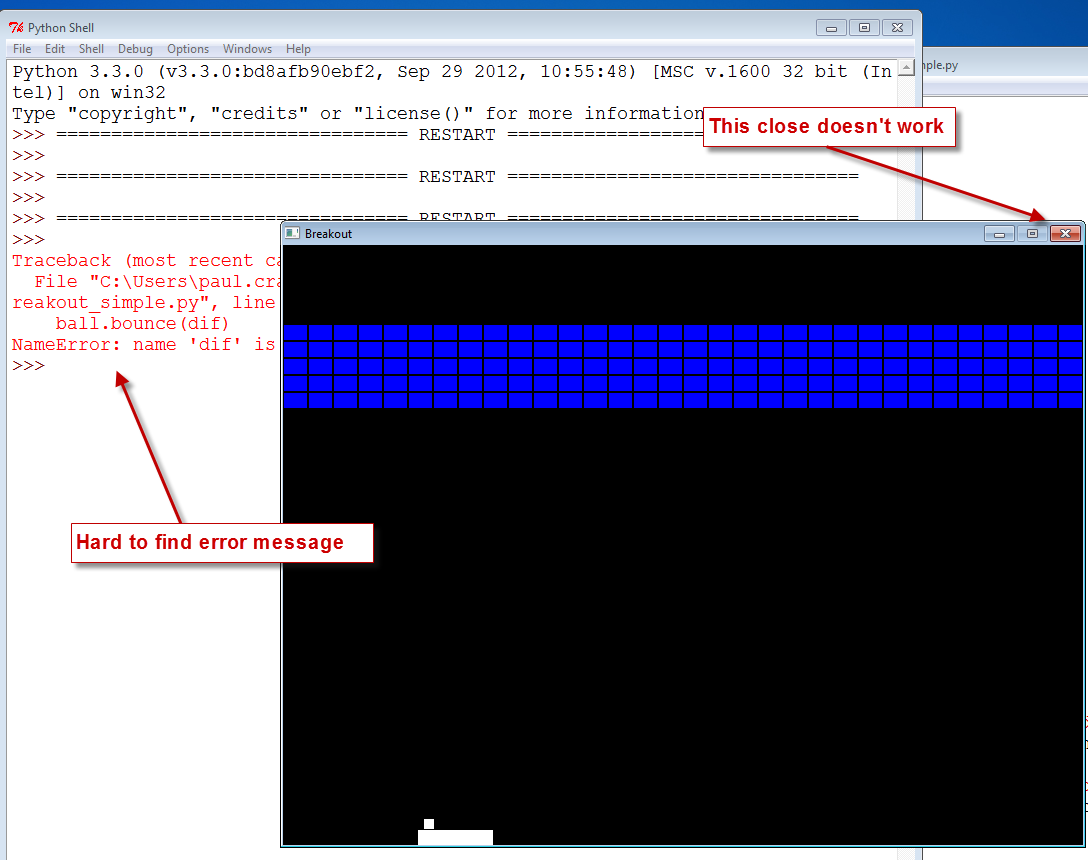
Issue 2, if there is an error in a program that does graphics the Python program
will crash and “hang.” Once the program has crashed it is difficult to shut down. The error
message that describes why it crashed is often buried and difficult to find.
See Figure 0.5.
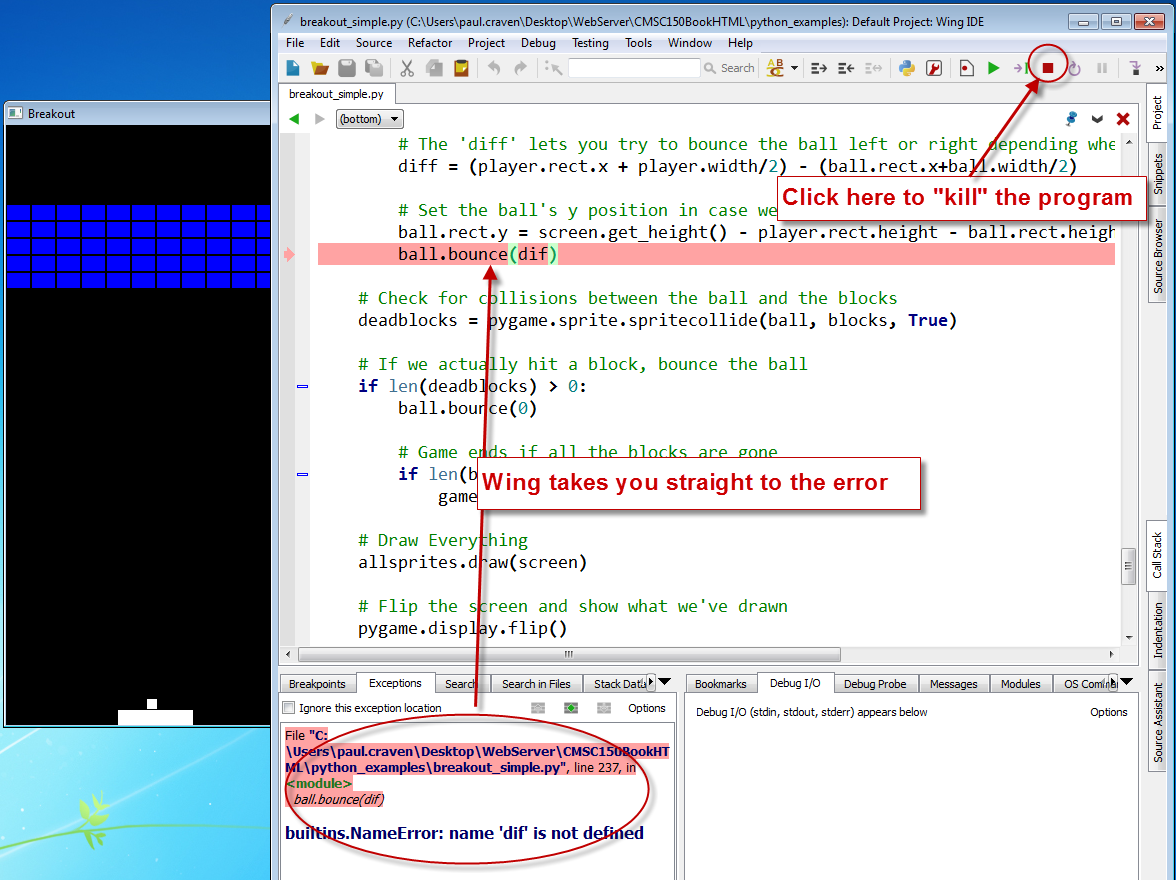
The Wing editor solves issue 1 by using an editor with a tab for each file.
It will also prompt to save all files before running
a program. A program run under the Wing debugger does not hang as described
in Issue 2, instead the editor will immediately take the user to the line of
code that caused the error.
See Figure 0.6.
Therefore, while it is yet a third thing to install, I recommend using the Wing
editor. There is a free version called
“Wing IDE 101” at:
wingware.com/downloads/wingide-101/
There is no need for all the bells-and-whistles the commercial version comes with, but they are nice. The program will often help you by auto-filling in variable names as you start to type them. If you've got extra money and want to save time you might like to pick up the commercial version.
In the videos on the website I use either the default Python editor or the Wing editor. There are many other editors that can be used as well:
Amongst some developers, discussing “which is the best editor” is similar to getting a group of people together and discussing “which is the best religion.” It is best to pick your own favorite and then avoid this topic with other people.
0.2 Viewing File Extensions
It is a great idea to change your windows configuration to show file extensions.
A file usually has a name like Book report.docx where the
.docx tells the computer it is a Microsoft Word compatible document. By default Windows
hides the .docx extension if there is a program installed to handle it. If you
are programming, this hiding part of the file name can be annoying.
For Windows 7, to show file extensions, open up your computer's control panel. Find the selection for “Folder Options.” Click the “View” tab, and then unselect the option for “Hide extensions for known file types.”
For Windows 8, bring up a file explorer by hitting the Windows-E key. Then click the “view” tab and make sure “File name extensions” has been checked.
0.3 Learn to Make Games and Get Paid
As you start to learn to program, you might soon find that it
looks like work. We all know we'd rather skip work and go
farming for gold in World of Warcraft or Eve Online or some other game, right?
So why learn to program?
What does a person get out of it?

Learn how to make games and get paid? Ok, I won't pay you, but if you learn to program, there are plenty of people that will pay you. Here's how to profit:
- Learn to program games.
- Have fun making your own games.
- Select favorite job offer.
- Profit.
Look, no ??? in this plan!
Think about it. You can play games, but anyone can do that. Being great at a video game really isn't much of an accomplishment in life if you think about it. Or you can learn to create games. People care about that.
While you may be studying how to program games, tell your parents and co-workers you are studying computer science. It sounds better.
0.3.1 Why Study Computer Science?
Back to money. According to the National Association of Colleges and Employers (NACE) April 2014 Salary Survy, Engineering is the best paying discipline and computer science is the second.
| Average Salaries By Discipline | |
| Major | Average Salary Offer |
| Business | $53,901 |
| Communications | $43,924 |
| Computer Science | $61,741 |
| Education | $40,863 |
| Engineering | $62,719 |
| Health Sciences | $51,541 |
| Humanities & Social Sciences | $38,365 |
| Math & Sciences | $43,414 |
(Data is from the NACE April 2014 Salary Survey.)
While learning to program games, you can be studying towards one of the best paying four-year degrees you can get. And let's be honest, those engineering degrees usually take five years. Computer science is a great bet for a career.
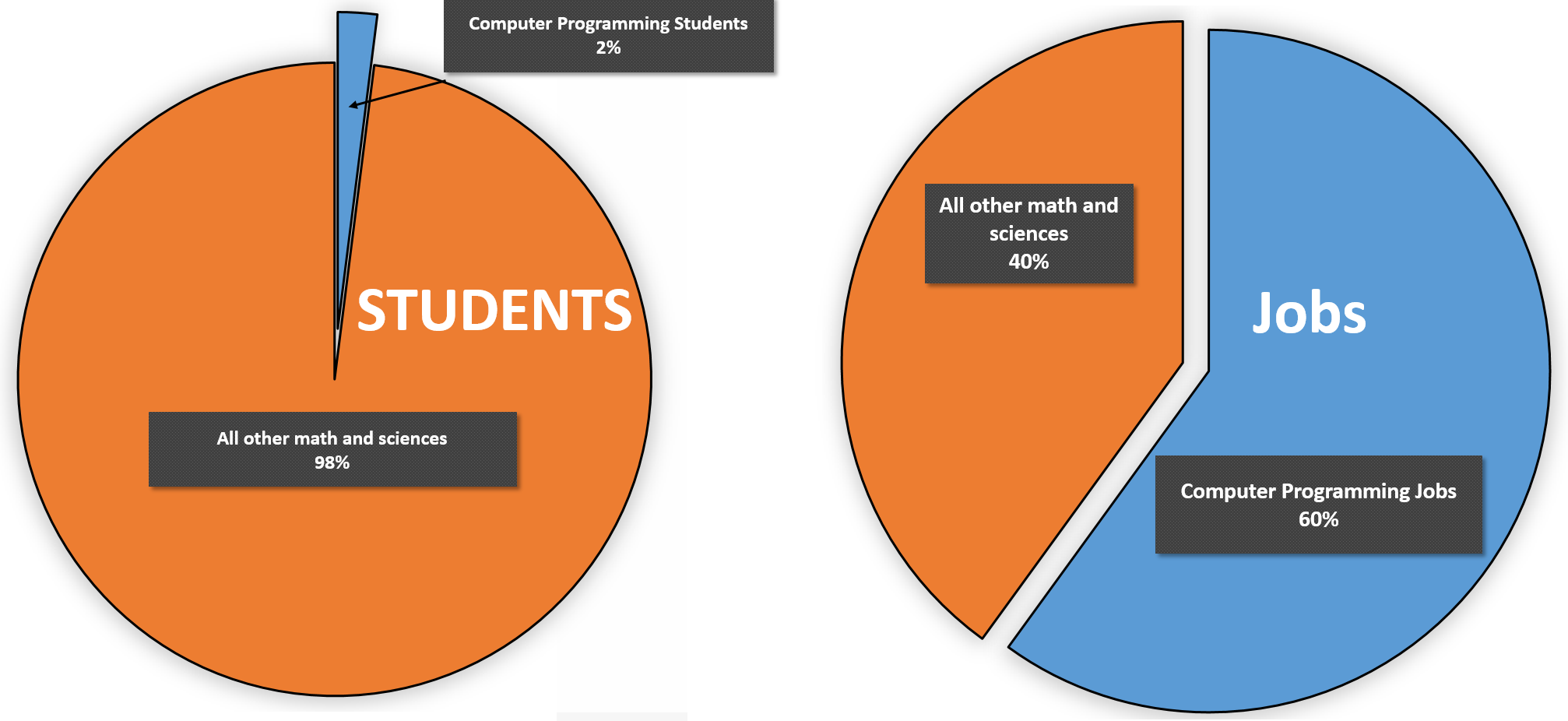
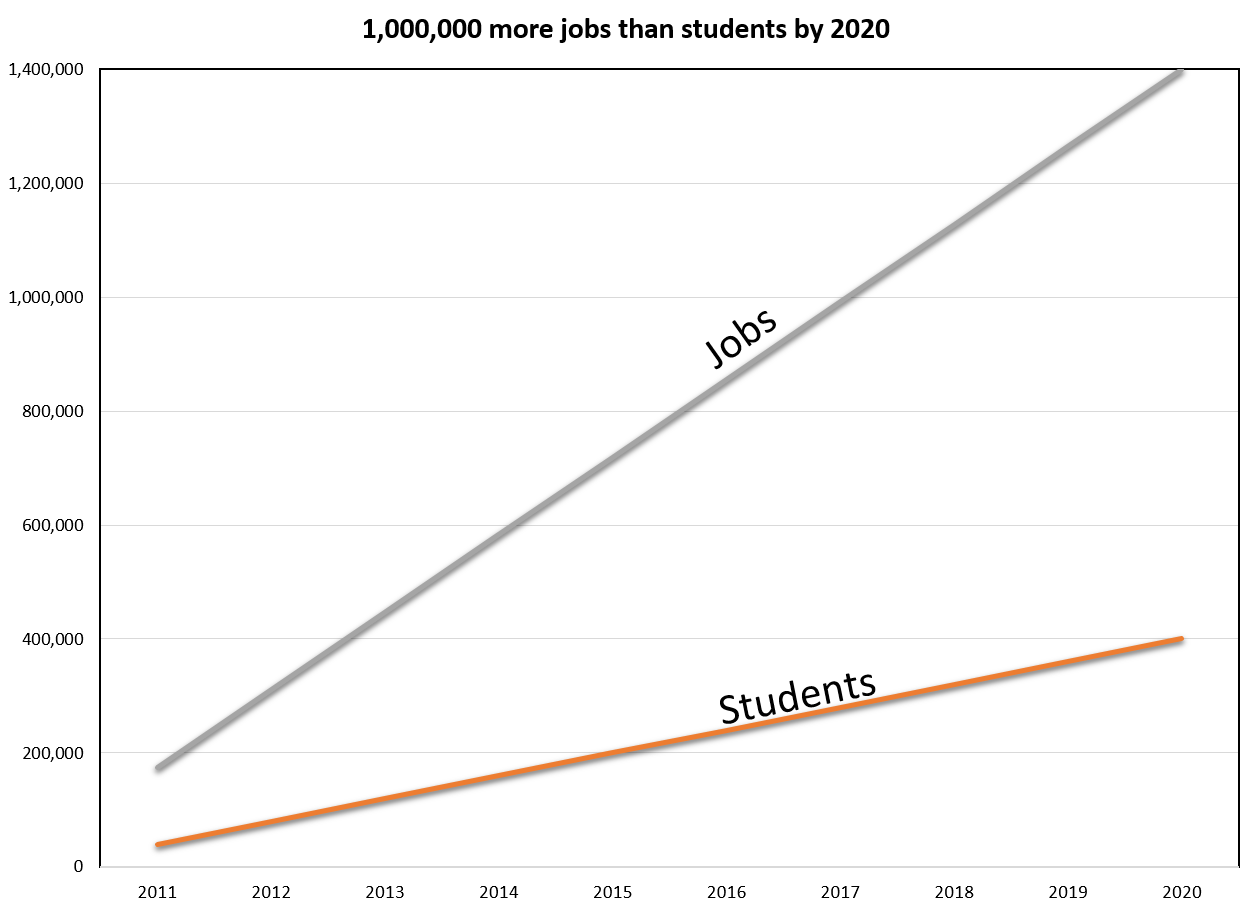
Why are computer science students getting paid so much? Because there is a lot of demand, and not many students. See Figure 0.8 and Figure 0.9.
What about a two-year school to learn programming? After all, two year schools offer a cheaper alternative to four year colleges. Way cheaper. But take a look at the table below. Use this “Average salary by education level” data as a caution about choosing a two year school:
| Average salary by education level | |
|---|---|
| Vocational/Tech School | $65,408 |
| Some College | $75,701 |
| High School | $79,370 |
| Military | $84,131 |
| College Graduate (4-Year) | $85,815 |
| Master's Degree | $97,811 |
| Doctoral Degree | $113,600 |
According to Dice.com's survey data, people in a technology career who graduate from a two-year school averaged $20,000 less than people who went to a four-year school. In fact, they did worse than dropouts from four-year colleges, and people who only went to high school! So go to a four-year school and skip the two-year school entirely.
This is according to the 2013-2012 Dice Technical Salary Survey. Note that the salary listed
is not the average starting salary. The numbers represent the average salary of all workers, no
matter how experienced. Of course, I think Simpson College has the best Computer Science department
in the midwest:
http://simpson.edu/computer-science
0.3.2 Get The Most From This Class
Looking to make your time here worthwhile? Answer the chapter questions! Don't skip them. They are necessary to understand the material.
Do the labs! This is even more important. Learning by only reading the material is about as useful as trying to become an expert basketball player only by reading a book.
Practice! You might see other people that don't have to practice. It isn't fair. Or, you might be smarter than other people, and they start doing better than you because they work at it and you don't. That's not fair either. That's life. Get used to it. Practice.
Are you taking this as a class? Great! Did you know you can save time and copy the answers and labs from the Internet? You can also buy yourself a gym membership and send someone else to work out for you. It makes about as much sense.
Seriously, what on earth are you thinking copying from someone else? If you aren't going to do the work drop out now and start filling out McDonald's applications.
If reading isn't your learning style, most of the information is available
through videos. You can skip the text entirely and just watch the videos by
checking out the YouTube playlist:
http://www.youtube.com/playlist?list=PL1D91F4E6E79E73E1
You can't learn without doing the work though. Do the reading. Ask questions.
Do the labs. Ask questions. Do the worksheets. Ask questions. Listen to the videos.
And ask your teacher questions.
0.3.3 Send Feedback
This is the text I use with the Simpson College class:
Computer Science 150
Fundamentals of Computing I
There is a print version available at Amazon and Barnes and Noble. There
is on-line version that is available at:
ProgramArcadeGames.com
The goal of the text, website, worksheets, labs, and videos is
to teach basic computer
science concepts and get students programming their own games as soon as
possible.
Drop me a note!
If you are using it for self-study or for another class, please drop me a note. The more people that use this resource, the more effort I'll put into improving it.
I've heard from a few high schools that use this material. If you are a student at one of these high schools, and liked this material, consider checking out the Computer Science Department at Simpson College. We'd love the chance to be able to work with you. Contact myself or admissions for more information.
If you notice any errors or omissions in the book, please send
me an e-mail. I'd like this to be the best resource possible.
Dr. Paul Vincent Craven
Department Head, Computer Science Department
Simpson College, Indianola, Iowa, 50125 USA
paul.craven@simpson.edu
English version by Paul Vincent Craven
Spanish version by Antonio Rodríguez Verdugo
Russian version by Vladimir Slav
Turkish version by Güray Yildirim
Portuguese version by Armando Marques Sobrinho and Tati Carvalho
Dutch version by Frank Waegeman
Hungarian version by Nagy Attila
Finnish version by Jouko Järvenpää
French version by Franco Rossi
Korean version by Kim Zeung-Il
Chinese version by Kai Lin